Read spatial omics
[1]:
import SOAPy_st as sp
import pandas as pd
Read Visium
we used 10X Visium data of mouse dorsolateral prefrontal cortex (DLPFC, 151676) as an example to read the 10X Visium data. To prepare raw data, follow these steps:
1.Raw data file could be download from https://research.libd.org/globus/.
2.Click jhpce#HumanPilot10x and 151676 in turn.
3.Download 151676_raw_feature_bc_matrix.h5, tissue_hires_image.png, tissue_lowres_image.png, tissue_positions_list.txt and scalefactors_json.json.
4.Rename tissue_positions_list.txt to tissue_positions_list.csv.
5.Assemble the folders as 151676/151676_raw_feature_bc_matrix.h5 , 151676/spatial/tissue_hires_image.png, 151676/spatial/tissue_lowres_image.png, 151676/spatial/tissue_positions_list.csv and 151676/spatial/scalefactors_json.json.
[2]:
adata_visium = sp.pp.read_visium2adata(
    path = './151676/',
    count_file = '151676_raw_feature_bc_matrix.h5'
)
/home/wangheqi/anaconda3/envs/SpatialOmics/lib/python3.9/site-packages/anndata/_core/anndata.py:1832: UserWarning: Variable names are not unique. To make them unique, call `.var_names_make_unique`.
  utils.warn_names_duplicates("var")
[3]:
adata_visium
[3]:
AnnData object with n_obs × n_vars = 4992 × 33538
    obs: 'in_tissue', 'array_row', 'array_col'
    var: 'gene_ids', 'feature_types', 'genome'
    uns: 'spatial'
    obsm: 'spatial'
Read GeoMx DSP
Read spatial transcriptomics data of NanoString GeoMx DSP. Mouse embryonic development samples are used as examples.
Download Count Results and E13 Images files from https://nanostring.com/products/geomx-digital-spatial-profiler/spatial-organ-atlas/mouse-development/ .
[4]:
adata_dsp = sp.pp.read_dsp2adata(
    # The path of 'Images' files
    xml_file={
        # Using the xml file for two samples as an example,
        # you can add key-value pairs to the dictionary if you need information about sample points for more samples.
        'mu_dev_E13_006': './nanostring_growth/mu_dev_E13_006.ome.xml',
        'mu_dev_E13_011': './nanostring_growth/mu_dev_E13_011.ome.xml'
    },
    # The path of Count Results
    information_file='./nanostring_growth/Export4_NormalizationQ3.xlsx',
)
[5]:
adata_dsp.obs.head()
[5]:
| SlideName | ScanLabel | ROILabel | SegmentLabel | QCFlags | AOISurfaceArea | AOINucleiCount | ROICoordinateX | ROICoordinateY | RawReads | ... | Timepoint | ROIID | SegmentID | ScanWidth | ScanHeight | ScanOffsetX | ScanOffsetY | LOQ (Mouse NGS Whole Transcriptome Atlas RNA) | NormalizationFactor | ExpressionFilteringThreshold (Mouse NGS Whole Transcriptome Atlas RNA) | |
|---|---|---|---|---|---|---|---|---|---|---|---|---|---|---|---|---|---|---|---|---|---|
| SegmentDisplayName | |||||||||||||||||||||
| mu_dev_E9_001 | 001 | Full ROI | mu_dev_E9_001 | mu_dev_E9_001 | 1 | Full ROI | Low Negative Probe Count for Probe Kit Mouse N... | 47287.021916 | 392 | 16573 | 18896 | 4259786 | ... | E9 | c73163bc-f107-498f-bd40-bbcab9a48993 | f057dc6e-68ce-441d-a816-58802fc38258 | 16904.210938 | 20578.818359 | 7932 | 6094 | 16.252453 | 0.536152 | 16.252453 |
| mu_dev_E9_001 | 002 | Full ROI | mu_dev_E9_001 | mu_dev_E9_001 | 2 | Full ROI | Low Negative Probe Count for Probe Kit Mouse N... | 41175.373907 | 340 | 16485 | 19752 | 4725639 | ... | E9 | be667b65-38c0-49c4-af51-845ffd8a7a85 | 09985ba0-449c-4b1a-9c8f-9327991df8fa | 16904.210938 | 20578.818359 | 7932 | 6094 | 17.745085 | 0.496225 | 17.745085 |
| mu_dev_E9_001 | 003 | Full ROI | mu_dev_E9_001 | mu_dev_E9_001 | 3 | Full ROI | Low Negative Probe Count for Probe Kit Mouse N... | 43198.870210 | 403 | 15756 | 18824 | 5958816 | ... | E9 | ba522e1c-7e21-4cc6-b529-118603949d5a | 2ac08d0d-c65d-4ab9-b834-5ef7ebbad4cd | 16904.210938 | 20578.818359 | 7932 | 6094 | 18.109046 | 0.395298 | 18.109046 |
| mu_dev_E9_001 | 004 | Full ROI | mu_dev_E9_001 | mu_dev_E9_001 | 4 | Full ROI | Low Negative Probe Count for Probe Kit Mouse N... | 44444.810459 | 368 | 15722 | 19675 | 3703922 | ... | E9 | 52d9a6b1-934d-4f42-a80e-a4a78b7ede43 | aeed549d-8b7a-4fa4-b22a-c54059e83066 | 16904.210938 | 20578.818359 | 7932 | 6094 | 14.509348 | 0.605782 | 14.509348 |
| mu_dev_E9_001 | 005 | Full ROI | mu_dev_E9_001 | mu_dev_E9_001 | 5 | Full ROI | Low Negative Probe Count for Probe Kit Mouse N... | 31889.529594 | 279 | 15064 | 18429 | 3069897 | ... | E9 | a9e0bca3-59a4-4131-90b7-c787ca400759 | c53d1b52-712e-4a3d-9af4-5bdb55365eef | 16904.210938 | 20578.818359 | 7932 | 6094 | 12.118616 | 0.717618 | 12.118616 |
5 rows × 35 columns
The sampling points corresponding to each ROI is stored in.uns.point.
[6]:
adata_dsp.uns['point']
[6]:
| slide | roi | x | y | |
|---|---|---|---|---|
| 0 | mu_dev_E13_006 | 1 | 13011.793535 | 10484.417086 |
| 1 | mu_dev_E13_006 | 1 | 13109.708338 | 10499.139178 |
| 2 | mu_dev_E13_006 | 1 | 13184.708338 | 10547.123928 |
| 3 | mu_dev_E13_006 | 1 | 13242.708338 | 10642.093747 |
| 4 | mu_dev_E13_006 | 1 | 13261.840745 | 10730.656697 |
| ... | ... | ... | ... | ... |
| 4171 | mu_dev_E13_011 | 58 | 4548.893838 | 10387.159712 |
| 4172 | mu_dev_E13_011 | 58 | 4477.882657 | 10362.799483 |
| 4173 | mu_dev_E13_011 | 58 | 4437.660936 | 10371.299021 |
| 4174 | mu_dev_E13_011 | 58 | 4487.202775 | 10425.060315 |
| 4175 | mu_dev_E13_011 | 58 | 4636.188087 | 10423.920083 |
4176 rows × 4 columns
Read other barcode-based data
In most cases, the raw data of barcode-based spatial omics technology can be expressed in two tables: the coordinate information of each cell (spot) and the expression of each cell (spot). This sp.pp.read_csv2adata() generates the Anndata format by providing the two tables by the user.
Here we use slide-seqV2 data from the mouse olfactory bulb as a demonstration. Download Puck_200127_15.digital_expression.txt.gz and Puck_200127_15_bead_locations.csv from https://singlecell.broadinstitute.org/single_cell/study/SCP815.
[7]:
express = pd.read_csv('./Slide_seqV2/Puck_200127_15.digital_expression.txt', index_col=0, header=0, sep='\t')
location = pd.read_csv('./Slide_seqV2/Puck_200127_15_bead_locations.csv', index_col=0, header=0)
[8]:
adata_csv = sp.pp.read_csv2adata(express.T, spatial=location)
[9]:
adata_csv
[9]:
AnnData object with n_obs × n_vars = 21724 × 21220
Read imaged-based data
The image-based spatial omics technology needs to perform cell segmentation first, and quantitatively generate anndata format through the results of cell segmentation. Users are required to provide images of cell segmentation and staining images for each marker.
Here we use one (sample 1) of breast cancer MIBI-TOF dataests as an example. Download from https://mibi-share.ionpath.com. chick Ji, Rubin, Thrane, Jiang et al.’s Download.
[10]:
import tifffile as tiff
import matplotlib.pyplot as plt
import cv2 as cv
image = tiff.imread('./mibi_tof/TA459_multipleCores2_Run-4_Point1.tiff')
mask = cv.imread('./mibi_tof/TA459_multipleCores2_Run-4_Point1/segmentation_interior.png')
mask = mask[:, :, 0]
[11]:
plt.imshow(mask, cmap='gray')
plt.show()

[12]:
plt.imshow(image[8, :, :], cmap='gray', vmax=5)
plt.show()
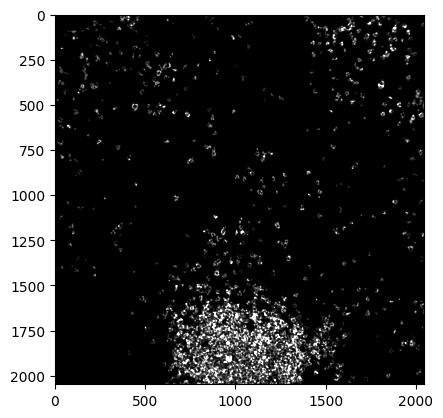
Determine the name of each channel and the channel that needs to be removed to obtain the quantitative Anndata.
[13]:
channel_names=[
    'Au','Background','Beta_catenin','Ca','CD11b','CD11c','CD138','CD16','CD20','CD209','CD3',
    'CD31','CD4','CD45','CD45RO','CD56','CD63','CD68','CD8','dsDNA','EGFR','Fe','FoxP3','H3K27me3',
    'H3K9ac','HLA-DR','HLA-I','IDO','CK17','CK6','Ki67','Lag3','MPO','Na','P','p53','PanCK','PD-L1',
    'PD-1','pS6','Si','SMA','Ta','Vimentin'
]

exp_removed = [0,1,3,19,21,23,33,34,40,42]
[14]:
adata_img = sp.pp.read_mult_image2adata(
    image=image,
    mask=mask,
    channel_names=channel_names,
    remove_channels=exp_removed
)
[15]:
adata_img
[15]:
AnnData object with n_obs × n_vars = 5240 × 44
    uns: 'img', 'mask', 'var_for_analysis', 'spatial', 'SOAPy'
    obsm: 'spatial'